Today I’m talking about Emacs, and about a piece of writing that declares it dead and buried just when, in my view, it’s about to have its best season yet. It’s called Emacs In the Age Of Magic, it’s a plain text file of almost two thousand words, and it argues that coding agents have wiped out, in one fell swoop, every advantage we Emacs users have been living off for decades.
I put it on my list of things to write about one Thursday morning, at half past eight, with a note that said more or less: an article on how I’ve organised my life and my work with Emacs, Org and Claude, with this text as a starting point. It was meant to be a starting point. It became a target.
I think exactly the opposite. A piece of software with half a century on its shoulders that’s still alive precisely because it lets itself be bent to anything, in an age when an AI will rewrite from scratch any program that won’t bend, is looking at a renaissance, not a retirement home.
§What it says, taken seriously
The text deserves a proper reconstruction, because it isn’t the usual forum rant. It starts from a very long way off: the digital era as the age in which a sealed transistor always gives you the same output for the same input, the expert systems programmers looked down their noses at, the split between Cambridge and Murray Hill as told by Richard Gabriel, academia’s Lisp versus industry’s C. After this preamble, which the author himself calls “long-winded” (and you can’t argue with him there), it finally gets to Emacs.
Editing speed, customization, the expressiveness of LISP: every advantage we claimed vanished the moment we stopped typing and started telling the AI what we wanted. We may have felt safe bringing a gun to a knife fight, but now everyone’s just sending a drone.
His example is Magit, and here he’s absolutely right. The little dance of C-x g, S, c c, the commit message dashed off and C-c C-c to finish was our small point of pride. Today Claude Code suggests a greyed-out “commit” after every batch of changes, and a tab-return is all it takes. Anyone who has used an agent for more than a week knows it’s true.
Then he walks through two case studies, with a sarcasm that at times genuinely made me laugh. The first is excali-mode.el, i.e. Excalidraw ported to Emacs’s new canvas widget. The author imagines how it went: the kid asks Qwen to use the canvas, the model suggests an embedded browser, the kid insists, and in the end the model reimplements the entire Excalidraw stack layer by layer, from JavaScript to Elisp, from the browser’s Canvas to Cairo and Pango. The second is cooked.el: on r/emacs people are discussing how to get a terminal that behaves like a text buffer, and a few days later a secondary-school kid publishes his solution, with a complete terminal emulator written in Rust inside it. The author calls it “a Boeing built in the back garden when all you wanted was to design a new control stick”, and he’s right here too: these are absurd exercises that nobody would ever have dreamt of attempting back when code was paid for in hours of work.
The irony is rich that AI has turned Stallman’s goal of software freedom on its head. Having your computer do whatever your imagination can think up – that’s real freedom. The only catch is you’ll have no idea how it works. No one does.
The text is unsigned, but the site hosting it promotes commercial-emacs, a fork of GNU Emacs with non-blocking Gnus, rewritten process handling and a garbage collector that moves objects around in memory, still experimental, and sells consultancy on Emacs as a platform. If the writer is the same person who works on the fork, as the site suggests, the pessimism comes from someone who has invested quite a lot in Emacs, and it should be taken seriously. Which is exactly why the point where I think he gets it wrong is worth a close look.
§The drone brings a knife
The way I read it, the argument doesn’t stop at Emacs. If the editor that lives in the terminal has lost its advantages because you just tell the agent what you want, the next step is that the whole terminal has lost them: the shell, grep, find, sed, the thousand command-line utilities someone like me has been using for twenty years. The text doesn’t put it in those words, but that’s where the drone metaphor is heading: CLIs are for old-timers, there’s chat now anyway.
The weak spot, though, is right there in the example he picked. That tab-return runs git commit. The drone, once it reaches the battlefield, pulls out the knives.
Claude Code is a command-line program. Its main tool is a shell, and on my computer it works exactly like a patient, lightning-fast sysadmin would: it reads files with cat and sed, searches with grep, gets around with find, queries GitLab with glab and GitHub with gh, downloads pages with curl and filters them with jq. When it needs to read or change my tasks in Org it calls emacsclient --eval and talks to the Emacs I already have running. The agent has become the most hardcore command-line user there is.
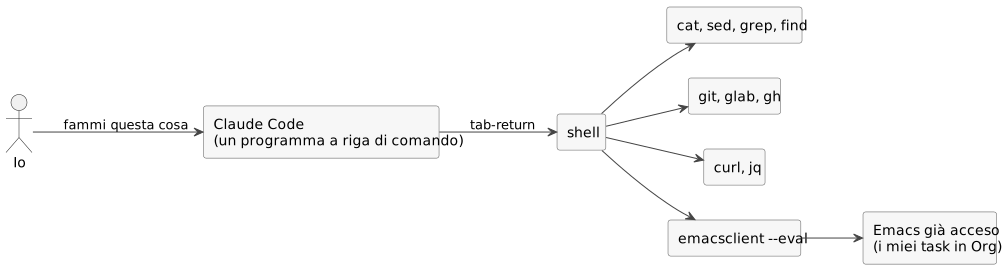
That’s no accident. The command line is made of programs that read text and write text, compose in a pipe and document themselves with a man page: it’s the kind of interface closest to the way a language model reasons. A program that only speaks in buttons and windows is, to an agent, a wall, or at best a screenshot to interpret, whereas a program that reads and writes text is a wide-open door.
This is where we come back to Emacs, which is the extreme version of this idea. Everything is a text buffer, every action is a named function, and every function can be called from outside. To an agent, Emacs is the richest terminal there is.
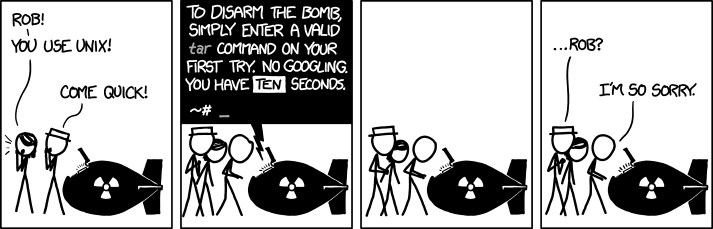
Credit where it’s due to the drone: it does remember the tar options. xkcd 1168, “tar”, by Randall Munroe, CC BY-NC 2.5 licence.
§Bend it or rewrite it
When asking an AI to rewrite a program from scratch costs next to nothing, every piece of software faces the same question: do you bend it, or redo it?
At the beginning of October Brandon Thomas released ArtCraft, an open source suite of seven applications that aim to replace Adobe’s, from Photoshop to Premiere, from Illustrator to Acrobat. It’s written in Rust, with Claude, and after a couple of weeks PhotoCraft alone already had around 67,500 stars on GitHub. It’s still an alpha, the authors themselves say it isn’t up to professional work, and among its limitations is (I’m not making this up) plugin compatibility. The stated reason is subscriptions, but I think there’s something else underneath. Photoshop does have plugins, but inside the fence Adobe decides on: you can’t take the program and bend it to what you need. Had Adobe allowed the suite to be extended arbitrarily, much of that frustration would have gone into extensions rather than a rewrite, and ArtCraft wouldn’t exist today, or would be a rather less viral project than it is.
And it’s not a matter of proprietary versus free software. LibreOffice is free, but it’s a monolith: extensions go through the UNO API, writing one is a project in its own right, using them isn’t exactly a walk in the park, and in 2026 there’s still no decent extension store. Had LibreOffice let itself be bent like Emacs, today, with an agent in hand, it would be the tool of the century. Instead, anyone who wants a word processor done their way asks an agent to write them a new one.
Emacs sits at the other end. Every function can be redefined while it’s running, every variable changed, every key remapped, and with an advice you can slip in before, after or instead of any command, including the ones you didn’t write. It’s arbitrary extension taken literally. You don’t have to rewrite Emacs: you bend it.
For decades, though, bending it came at a price. Anyone who has tried to use it seriously knows the learning curve, the one in the memes where the line goes straight up and then curls back on itself. Loads of people gave up, because to get it to do things you had to learn Elisp, wade through the manual, throw your weekends away on configuration and accept that your editor would be a never-ending building site. The advantage Emacs users claimed was real, but it was the advantage of those who’d paid for the ticket, and most people, quite rightly, had better things to do.
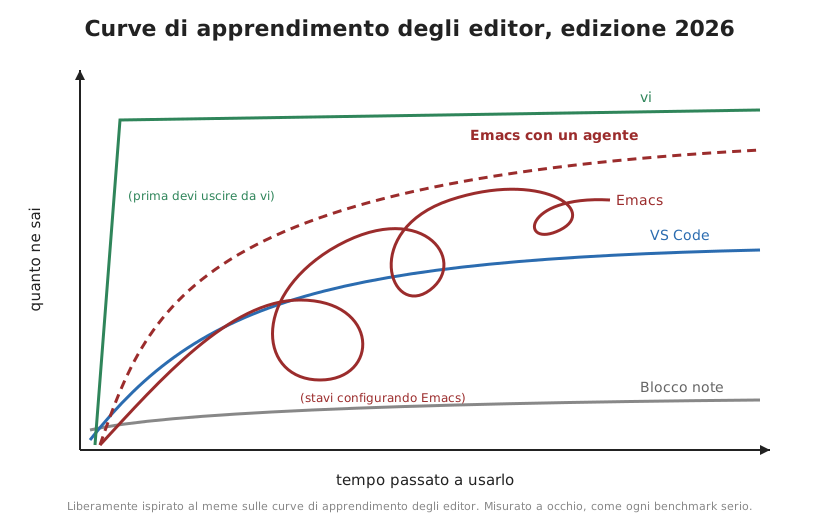
Agents have slashed the ticket price and left the value where it was. If bending a program costs you ten minutes instead of a weekend, the software that bends the most stands to gain the most, and for fifty years no software has bent like Emacs. Malleability, the flaw you used to have to explain to colleagues, becomes a superpower in an age when any program can be rewritten from scratch: all the others you redo, this one you change.
The author would say, and partly does say, quoting the article The Emacsification of Software, that at that point everyone will have their own little Emacs and will get a Markdown viewer generated just the way they like it, a mail client just the way they like it, and Emacs will lose its exclusivity. It’s the most serious objection in the whole text, and it’s exactly what happens to programs that won’t bend: ArtCraft is the freshest example. In my view, though, the answer lies in the difference between a program and an environment.
The throwaway program the agent writes for you in ten minutes is an island. It has its own shortcuts, its own file format, its own way of saving settings, and it knows nothing about the other throwaway programs you had made the week before. Every extra island is one more bit of complexity you have to keep in your own head. In Emacs the same work ends up inside an environment that was already there, with the same buffers, the same keys, the same search and the same Org files where my notes and tasks live, and the new piece slots in with the old ones instead of sitting next to them.
In Emacs, what’s more, the documentation lives inside the editor itself: an agent can ask it what a function does, which key a command is bound to, what variables a mode has, and the answer is always the true one, from the code running at that very moment. It doesn’t have to guess, and that’s the same reason it works well with the shell and badly with a graphical interface.
And there’s a detail the author misses: his two examples of waste, excali-mode.el and cooked.el, are Emacs packages. Whoever wrote them had at their disposal what he calls “a godlike machine”, could have had any application generated for them, and chose to write it for Emacs. The technical choices are debatable, and the author’s sarcasm is entirely fair, but they’re still the product of people who, with an agent in hand, decided to build inside Emacs.
§A configuration for four hands
My evidence is right here on my desk, and it’s the config.org file that lives in ~/.emacs.d.
My Emacs configuration has been a literate programming document for years, and on this blog I’ve already told you, in Italian, why I think it’s the right way to write code that has to last. The Elisp code sits inside source blocks, and the prose around it explains what each piece does and above all why I chose it. At startup Emacs pulls the code out and runs it.
On 7 November 2025 I rewrote it from scratch together with Claude Code: a single commit, around 9,500 new lines. Today config.org is over 10,000 lines, in Italian, in the first person and in my own voice. In the same folder there’s an AGENTS.md explaining to any agent how it’s put together: you only ever edit the document, never the generated file, packages are installed in a particular way, and before claiming a change works you run two specific commands in batch. They’re the same rules I’d give a new colleague on their first day.
More than the quantity, though, what matters is that the agent opened up paths I wouldn’t have taken on my own. One example is the cheatsheet that opens with F7. I wanted a way to remember the commands I rarely use, and good old which-key wasn’t enough, because it answers the question “what’s bound to this key” and what I needed was “how do I do this thing”. What came out is a cheatsheet of hand-picked commands, split by topic, that shows you first the sections relevant to the buffer you’re in. Nobody writes the keys by hand: Emacs reads them from the actual keymaps the moment I open the view, so if I change a binding the cheatsheet updates itself. The reference chapter at the bottom of config.org comes out of the same list, and a check command warns me when I define a key and forget to register it.
The funny thing is that the solution I had in mind was a different one: a Transient menu for each area, like the one I was already using for AI. We discussed it the way you discuss an architecture decision, with an ADR and a Pugh matrix, and the menus lost: they gave discovery and execution, but no overall picture, and I’d have had to write and maintain one for every area. The curated data cost more to build and next to nothing to maintain. It finished plus two to minus one, and the path I hadn’t even considered won.
None of this would be possible if Emacs didn’t let you get your hands into everything. The cheatsheet works because Emacs always knows, at any given moment, which key leads to which command, and tells anyone who asks. The agent wrote the code, but the possibility had been there for decades: all that was missing was someone with the time to exploit it.
How the configuration is built, piece by piece, I’ll cover in a series of guides coming out over the next few weeks: the configuration as a document, the cheatsheet, tasks, the second brain, AI, writing and the IDE.
§The Eisenhower matrix, seven years on
The cheatsheet is something I’d never have thought of on my own. The example that convinces me most, though, concerns something I already had, and that worked badly to boot.
In 2019 I republished an article by Tom Purl here on how to use the Eisenhower matrix in Org mode: two tags, important and urgent, and four agenda searches, one per quadrant, to be opened one at a time. I copied them into my configuration in December that year and dragged them along with me for years.
They were four separate views, to be opened one at a time, and I had to piece the overall picture together in my head. At eight in the morning, before coffee, I don’t piece anything together in my head, and sure enough, for years I looked at the matrix far less often than I’d promised it.
With the 2025 rewrite those lines stayed behind in the old configuration, which I no longer load, and in their place a function popped up that built a plain-text buffer: icon, age, title. Readable, but useless, because no line knew which task it came from, and in a file with seventy-odd open tasks, to change the state of one I had to go and fish it out by hand. So I stopped using it.
In September this year I went back to it, and this time I started from what I actually needed to do with it: a read-only view where every action on a line lands in the file the task comes from. The decision went through an ADR with three alternatives (building the view on the Org agenda, using org-super-agenda, writing a mode of my own), compared with a Pugh matrix against the existing version. I picked the first, which adds no dependencies and brings along all the agenda commands.
Today C-c m opens the matrix for the file I’m in. Each quadrant has its own coloured heading and task count, and next to each task are its age in days (yellow past 30, red past 90) and the parent heading instead of the full path. Within a quadrant come first the tasks in progress, then the ones I’ve picked for the next few days, then everything else. The keys 1 to 4 move the task under the cursor into the corresponding quadrant, and all the other agenda commands (changing state, scheduling, opening the task) work directly on the file.
Two problems only came to light by trying it out. The Org agenda keeps the references between lines and tasks in a global variable, so just opening another agenda was enough to leave the matrix lines pointing into thin air. And Org repaints every line with the default face, wiping out the age colours. Both are explained in config.org, next to the code that works around them.
The text list had come out of a ten-thousand-line rewrite in which the matrix was one detail among a thousand. The version I use now was born from a written requirement, from a comparison of alternatives made before writing a single line of code, and from a choice of mine, with the explanation next to every block. The agent was the same; what changed was the way I worked with it.
Now I open it every morning, during the review. For each quadrant I choose the NEXTs, with a precise cap (three in Q1, three in Q2, one in Q3, five in Q4), and the morning-routine agent already proposes them: I confirm, move, discard. The age colour does the rest. A red task in Q2 is a decision I’ve been putting off for more than three months, and seeing it red every morning does, sooner or later, have its effect.
§A package built for a swarm
The second piece of evidence is blueprint.el, a package I wrote for a job I often find myself doing: reconstructing the architectural documentation of software systems that don’t have any, starting from the code.
It started life as a Python script. At some point I realised the whole workflow already lived inside Emacs and Org, and that calling Python to manipulate files Org can handle perfectly well on its own was a pointless step. So I rewrote it in Elisp, or rather, to all intents and purposes, an agent did: today it’s around 9,600 lines of Elisp across 36 files, plus 29 test files.
In practice it wrote the code and I made the decisions: what to do, how to structure it, when its code wasn’t good enough and when it was time for it to go for a little walk. The relationship, let’s say, isn’t one between equals, and in the post on blueprint.el I also tell you in what tone I remind it of that.
Here, though, what I’m mostly interested in is who it’s built for. blueprint doesn’t use a language model internally (there’s an optional Ollama integration, but it’s an extra). I call it agentic because it’s designed to be used by several agents concurrently. Each component of the documented system has three separate files, one for architecture, one for functional specifications and one for infrastructure, and the cross-cutting parts (risks, constraints, glossary, sources, decisions) have their own files. Each file is a zone an agent can take charge of without treading on the others’ toes. Open points are markers in the text, such as QUESTION or TBD, which the package counts to compute a health score for the document, and to an agent they’re already the to-do list. And every function can be called from the command line with emacs --batch, while lint, validation and export exit with specific codes.
The same package works perfectly well by hand too, from a Transient menu under C-c b, the way you’d use Magit, but with several agents working on it in parallel, each in its own zone, it gets a lot more done. The decisions stay with whoever uses it: a QUESTION is the point where the agent stops and the ball goes back to a person.
The rest, from the file structure to the health score, down to the commands an agent calls from the command line, is in the post on blueprint.el.
Here too Emacs does what it’s always done: text, named functions, everything callable from outside. Only now there’s someone on the other end capable of exploiting it at industrial speed.
§Knowing how it works
That leaves the closing line of the text, the one that annoyed me most, not least because I partly agree with him: “You’ll have no idea how it works. No one does.”
I wrote an entire post, Il software che non puoi smontare (“The software you can’t take apart”, in Italian), on how much it irritates me to use systems I can’t understand, and I’d be inconsistent if I now defended a package of thousands of lines written largely by an agent while pretending the problem isn’t there. The problem is there, and excali-mode.el is the perfect case: an entire application translated by a model into another language, in all likelihood without a single human being who knows every line of it.
In my view, though, not understanding depends on how you work more than on the tool you use. If you ask an agent to generate a program and use it without looking at it, you’ll never know how it works, whether you’re using Emacs or anything else. If instead you make it work inside a document you read, it’s a different story.
My configuration is written so that every code block has a paragraph next to it explaining why it’s there. When the agent adds something, it adds the explanation too, in my language, and I read it. The rules it works by are in a file I can open whenever I like. blueprint has its tests, its ADRs and an AGENTS.md that tells the agent what it may and may not do. It’s all text, all under version control, and I read it with the same editor I’m writing this post in.
Knuth invented literate programming in the eighties to force programmers to explain their code to a human being. Forty years later, I need the same discipline to force an agent to explain its code to me, and the place where that explanation gets written is Org mode, which lives inside Emacs.
I don’t read everything, and it would be ridiculous to claim otherwise. I always read the prose the agent writes next to the code, because that’s where you can see whether it understood what it was supposed to do. I read the diffs of the parts that touch the things I care about, meaning my data, my tasks and anything to do with security, and I read the tests. Routine code, the kind that does exactly what the explanation says, I spot-check. It’s the same deal I’d have with a good colleague: I trust you, but the door stays open and I check whenever I like.
On one thing the author is right: a computer that does whatever your imagination can think up is a form of freedom. Only it’s the same promise Emacs has been making since 1976, when it was still a bundle of macros for TECO. The difference is that today that freedom costs ten minutes instead of ten years, and I log the expense in an Org file.
§Sources
- Emacs In the Age Of Magic, unsigned text, commandlinesystems.com/magic.txt.
- Command Line Systems, commercial-emacs presentation page, commandlinesystems.com; repository commercial-emacs/commercial-emacs.
- Rudy Sanchez, “ArtCraft Launches an Open-Source, AI-Powered Alternative to Adobe’s Creative Cloud”, Dieline, 8 October 2026; Design Compass, “ArtCraft, a free Adobe alternative program created by an individual”, 19 October 2026, for the GitHub stars and alpha status.
- blueprint.el, repository on GitHub.
- Tom Purl, “Using The Eisenhower Matrix In Emacs Org-Mode”, republished on this blog in 2019.
- Randall Munroe, “tar”, xkcd 1168, CC BY-NC 2.5.
- Donald E. Knuth, “Literate Programming”, The Computer Journal, 27(2), 1984, pp. 97-111.