This is the story of a Friday night when all I wanted was to watch a film on my wife’s laptop, in the big bed with the whole family. Instead, the bloody streaming services won’t even start unless you’re up to date with the fucking betas of the fucking browsers, which must invariably be Google Chrome. Not Chromium, not Opera, not any of my weirder browsers like Falkon or Konqueror, and not Firefox either, mind you. Web standards and DRM, enabled and working, count for nothing. Because no, end of story. Don’t ask, mind your own business. And pay an ever higher subscription for an ever worse service, stuffed with series and films of questionable quality. That’ll be 50 euros, thanks.
So I decided to update the laptop, or rather, to migrate it. On a Friday night. I’ve learnt fuck all in 20 years of honourable service. Then I spent a Saturday morning putting back together, one piece at a time, everything I had inevitably broken, and along the way I learnt a whole lot about UEFI firmware that in all my years of Linux I had never needed to know (and that, to be honest, I’d happily have gone without finding out, especially like this).
In the end the laptop works again, with SELinux in enforcing and the F2 key opening the BIOS once more. And what gave me my BIOS back was a CRC32 hidden in a UEFI variable that in all likelihood you’ve never looked at either. Not even its own mother has ever looked at it. The Lenovo designer who didn’t think of a way to restore the BIOS must have taken one look at it and gone “well, would you look at that”.
§Friday night, everything under control
The laptop is a Lenovo V15-ADA: Ryzen 3 3250U, 8 GB of RAM, a 256 GB SK Hynix NVMe and an Insyde firmware that goes by the name of E8CN27WW (I wouldn’t invite it to my party). On the disk there’s openSUSE Leap 15.6 with old-school partitioning: a separate /boot in ext2, the ESP in FAT, swap and a Btrfs root with all the usual subvolumes. Nothing exotic, in short. I’d already had my nightmares in 2013 with openSUSE, Btrfs and Secure Boot, and apparently we hadn’t finished getting acquainted.
Before getting to the migration, though, I tried the short route. zypper update had nothing to update, nor did flatpak update (Chrome is on Flatpak), and even the Packman repository, added specifically for fresher codecs and DRM, didn’t change the situation one jot. At some point I realised it was the Leap 15.6 repositories that had fallen behind, and that to get out of it I’d have to work out what was missing, fish out packages by hand and add a few more repositories: all stuff I had no desire whatsoever to do, and that in hindsight would have been infinitely easier than what happened next. I’d been putting off the migration to Leap 16 for months, it had to be done sooner or later, and that Friday night seemed like a good opportunity.
Leap 16 came out last autumn and brings quite a leap with it: the kernel goes from the 6.4 series to 6.12, AppArmor makes way for SELinux, and for those coming from 15.6 there’s an official tool, opensuse-migration-tool, which promises to do everything for you. You launch it, pick the version, wait for it to finish and reboot. So I did, and the first boot went as smooth as silk, apart from one line GRUB spat in my face before loading the kernel:
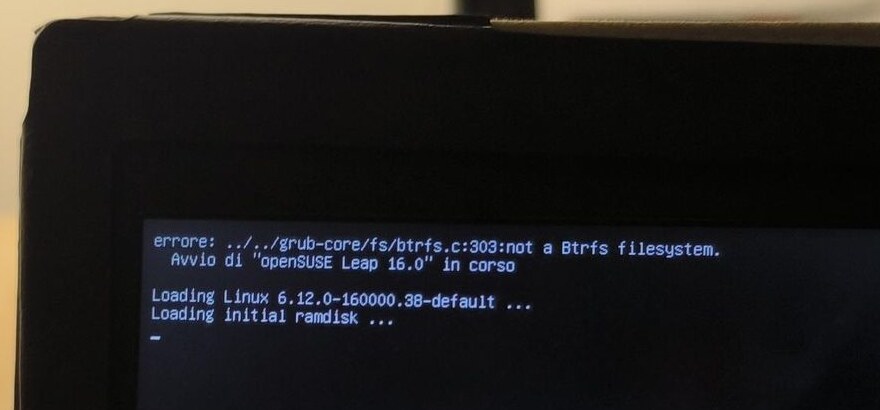
errore: ../../grub-core/fs/btrfs.c:303:not a Btrfs filesystem.
  Avvio di "openSUSE Leap 16.0" in corso

Loading Linux 6.12.0-160000.38-default ...
Loading initial ramdisk ...
Today I know that line, in all likelihood, meant nothing: it’s a search that tries to read as Btrfs a partition that isn’t Btrfs, fails and moves on to the next one, so much so that right below it the kernel and ramdisk get loaded as if nothing had happened. But on a Friday night, with a version jump just done and that word, errore, planted right at the top of the screen, instinct got the better of common sense, and I did what anyone with a bit of familiarity with openSUSE and no desire to dig deeper at eleven at night would do: I ran update-bootloader --reinit, which regenerates the bootloader configuration and reinstalls it on the ESP.
On the next reboot the laptop didn’t come back up.
§An emergency shell that won’t give you a shell
systemd got roughly halfway and then hung on the /boot mount, dragging everything else down with it:
[FAILED] Failed to mount /boot.
See 'systemctl status boot.mount' for details.
[DEPEND] Dependency failed for /boot/efi.
[DEPEND] Dependency failed for Local File Systems.
Nothing dramatic so far, because that’s exactly what emergency mode is for in these cases: it asks for the root password, gives you a shell and you fix things. Except the password was accepted and straight afterwards sulogin told me it couldn’t load either /bin/bash or /bin/sh, and pressing Ctrl-D to retry brought me back to exactly the same spot. It was past midnight, and I was staring at a screen that asked me for the password only to tell me it had nothing to give me in return.
Plan B was the GRUB menu, where I could add a few parameters to the kernel line and see what happened. Shame that at some point, so as not to wait a few seconds at every power-on (an eternity, evidently), I’d set GRUB_TIMEOUT=0, so the menu never appeared. GRUB does actually show a message, “Please press ‘t’ to show the boot menu on this console”, and for a moment it looked like the way out; then I discovered it’s a hidden entry SUSE adds to the menu to switch to the text console, and that it only works when the menu is visible, which is never, with the timeout at zero. I also tried holding down Esc and Shift during boot, to no avail.
At two in the morning, with my eyes closing on their own and the feeling of having gone round in circles for three hours, I raised the white flag and went to bed, consoling myself with the thought that the USB stick was still there, which to a half-asleep me with morale in my boots seemed like the easy part. After all, it had never let me down: I’ve rescued hundreds of systems with nothing but a USB stick or a CD with SystemRescue. The first version of sysresc I used was something like 2 or 3. Now we’re at 13. So many (traumatic) memories.
§The USB sticks that go back to the disk
By seven in the morning I was already up and in the loft, where I have my PC and the workshop with all the tools, ready to pick up where I’d left off. I downloaded the Leap 16 offline ISO, 4.2 GB, wrote it to a stick with a very hasty dd, pressed F12 at power-on and chose the USB. The laptop printed something illegible for half a second and then relentlessly did as it pleased: it booted openSUSE from the disk, all the way to the usual non-working emergency mode (damn SELinux, you’ve ruined Linux distros!).
I thought of Secure Boot, because Leap 16 brings a newer shim that in theory can revoke older bootloaders and get live images rejected, and I went to disable it in the Setup. On the next reboot Secure Boot was enabled again, as if I hadn’t touched a thing. I tried again with other live images, and in the end even with SystemRescue, which has nothing to do with shim, and the result was always the same: the firmware pretended to boot the stick and then fell back on the disk.
That’s where I got properly demoralised. Nothing booted any more, not even live images, the Setup ignored what I asked of it, and the laptop seemed to have decided that the only thing it would ever boot was a broken system. To Claude, Anthropic’s language model that I often use as a reasoning companion and to whom I’d been reporting my (scant) progress for a few hours, from the PC and the phone, with photos of the screen snapped on the fly, I wrote more or less this: “I’m starting to despair a bit”.
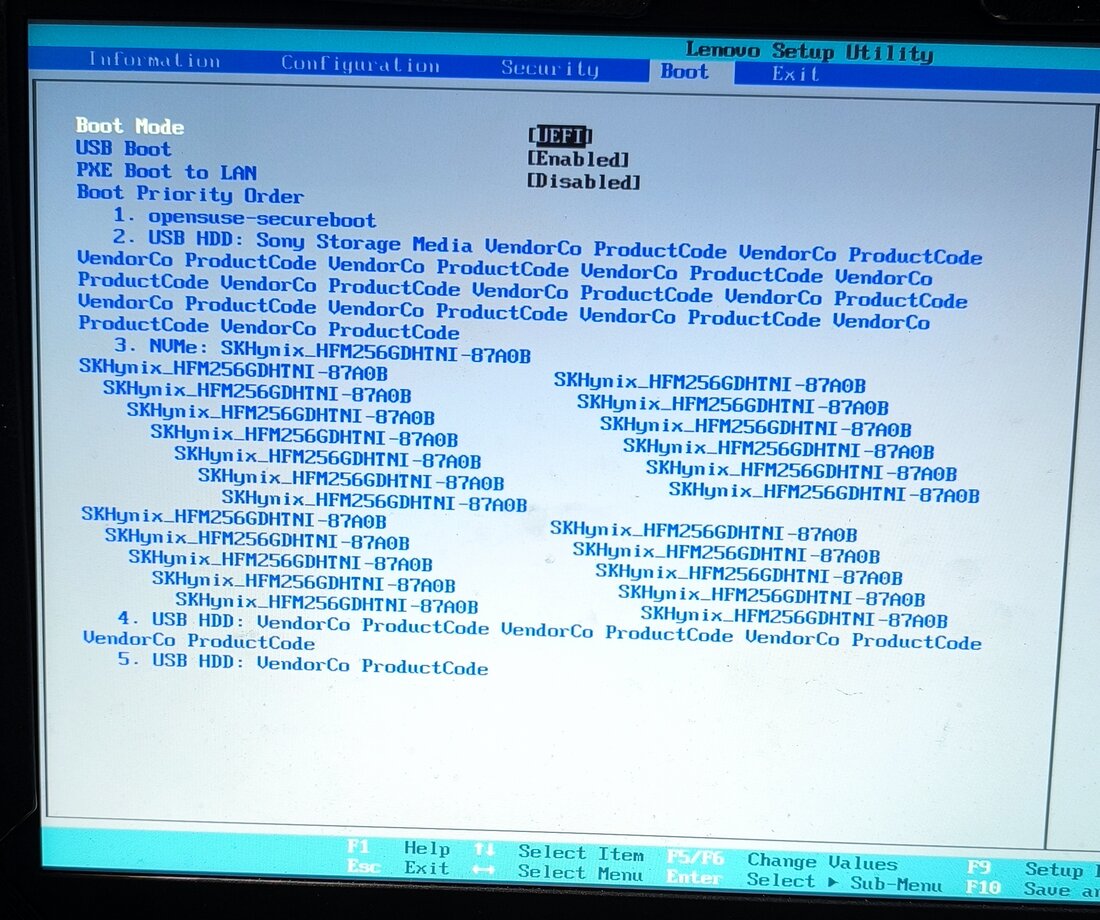
The first real clue, though, I found by looking at the boot entries. In the F12 boot menu there were four identical opensuse-secureboot entries, one below the other, and in the Setup’s Boot tab the names of the other entries grew longer by repeating themselves: “USB HDD: VendorCo ProductCode VendorCo ProductCode VendorCo…” and the disk name repeated dozens of times, like a broken record (the vinyl kind, this time).
§The NVRAM was full
UEFI variables, meaning boot entries, boot order, settings and even the Secure Boot keys, live in a small region of the firmware flash. Really small, and on many firmwares the space of a deleted variable only becomes free again when the firmware decides to compact the region, which is to say whenever it feels like it.
The reconstruction I arrived at, and which from outside the firmware I can’t fully verify, is this: choosing a device from F12 requires a write to NVRAM (in all likelihood the BootNext variable), and if the write fails the firmware doesn’t complain, it follows the normal BootOrder and starts from the disk. The Secure Boot setting is a variable too, and if the firmware can’t write it, on reboot it reads back the old one. Four duplicate entries, corrupted names and settings that won’t save: it all added up, if the NVRAM was full.
To prove it, the simplest idea was also the most brutal: if the firmware always falls back on the disk, let’s take the disk away. On the workshop bench I removed the bottom of the laptop, disconnected the internal battery and pulled out the NVMe, then powered back on with the SystemRescue stick inserted, and SystemRescue started first time. “Looks like it really was the NVRAM being full”, I wrote, and I was happier than I’d been in hours.
For a moment I even thought about getting clever, booting the live image without the disk and slotting the NVMe in hot once it was up, and luckily before doing it I asked: the M.2 slot of a consumer laptop isn’t designed for hot plugging, and the most I’d have got, in the best case, was an undetected disk.
§I cleaned too much
From SystemRescue, with efibootmgr, I started tidying up with the zeal of someone who’s finally found the culprit. I deleted the duplicate opensuse-secureboot entries, the ones with corrupted names and quite a few others I didn’t recognise, and I remember removing Boot000A, 000B, 000C and a run between 0011 and 0016, maybe 0017 and 0018 too. Only Boot0000, the openSUSE entry, was left, and I immediately felt pleased with myself for having sorted out that mazzumàja1.
Then I put the NVMe back, powered on, and the laptop hung on the Lenovo logo, without the beep that usually goes with F2 and F12, with the fan spinning at full callàra2 and nothing else. I waited more than five minutes, thinking of the memory training Ryzens redo after the battery’s been disconnected, but the logo stayed there motionless, and at that point the fear of having done serious damage was real. Without the stick, luckily, the laptop started from the disk (broken, but it started), whereas pressing F12 it froze on the logo again. The BIOS, quite simply, seemed not to exist any more.
It was by mulling over that “seemed” that the right doubt came to me: what if the Lenovo BIOS was itself an EFI program, registered among the boot entries? And what if one of the entries I’d deleted was exactly that? The answer was yes, on both counts. On many Lenovos, and on this one for sure, the Setup and the boot menu are registered in NVRAM as application-type Boot#### entries, with a path like FvFile(<GUID>) pointing to a module inside the firmware, and I had deleted those entries along with the rubbish.
Confirmation came from a command I’d never used in my life. From SystemRescue, still without the disk, I ran:
systemctl reboot --firmware-setup
This command doesn’t go through any boot entry: it sets a bit in the OsIndications variable, and on reboot it’s the firmware itself that enters the Setup. And into the Setup it went, all right. The code was all there, intact, only the pointers to reach it from the keys were missing. I also tried F9 (Setup Defaults) followed by F10, hoping the firmware would recreate its entries by itself, but it didn’t happen.
The thing that made me angriest I discovered later, reading the UEFI specification, which provides for this very case: every hot key carries the CRC of the entry it’s meant to launch, and if the CRC doesn’t match, because the entry has changed or because it’s gone, the key is to be ignored.
If the CRC-32s do not match this value, then this key option is ignored.
This laptop’s firmware, instead of ignoring it and getting on with the boot, freezes.
§Two things to do
At that point I had two quite distinct problems, and I lined them up: get openSUSE back on its feet, and put the firmware applications back where they belonged.
For the first I needed a live image that would start with the disk installed, and the idea I had was simple and a bit perverse: if I delete Boot0000 too, the firmware has no entry left pointing to the disk, and at that point it has no choice but to start from the stick. First I photographed the output of efibootmgr -v, to have the data needed to recreate the entry to hand (the ESP partition, its GUID, the path to shim.efi), then I deleted it, put the disk back, and SystemRescue started with the NVMe in place. Still no F2, but it was something.
For the second, honestly, I hadn’t the foggiest idea how to go about it, so I set it aside.
§Inside the system, hunting the culprit
From SystemRescue I mounted the Btrfs root with no options, which on openSUSE means mounting the default subvolume, i.e. the active snapshot, and then /var separately, because it’s a subvolume on that install and I needed it to read a few logs:
mount /dev/nvme0n1p4 /mnt
mount -o subvol=@/var /dev/nvme0n1p4 /mnt/var
There was no persistent journal, because the system uses rsyslog and /var/log/journal doesn’t exist, but /var/log/boot.log had the whole failed boot, with its Failed to mount /boot in plain sight. I was convinced the culprit was fstab and that the /boot UUID no longer matched the partition’s, but the first lsblk proved me wrong, because the UUIDs matched perfectly.
The interesting detail I found in the kernel configuration. Leap 16 no longer has the ext2 driver: it has CONFIG_EXT4_USE_FOR_EXT2=y, which means ext2 partitions are mounted by the ext4 driver, and that driver is a module (ext4.ko.zst) that has to be loaded at mount time. The Btrfs subvolumes mounted without problems because the btrfs driver is already in the initrd; /boot needed to load a module, and couldn’t.
I knew the migration had turned on SELinux, so I went and counted the denials in the audit log:
grep -c 'avc: denied' /mnt/var/log/audit/audit.log
0
Zero. So I started looking elsewhere: /bin and /sbin, which I expected to be symlinks to /usr and which instead are real directories, modprobe that perhaps could no longer be found, a usrmerge left half-done by the migration. The binaries were all there, in their place, and it didn’t add up. Then, at Claude’s suggestion, I changed the pattern:
grep -c 'type=AVC' /mnt/var/log/audit/audit.log
373
In the audit log, after avc: there are two spaces, and I’d typed one. 

§SELinux without labels
SELinux, born at the NSA (and it shows: only a paranoid American could have conceived a tentacled monster of that scale), assigns every file a label, the so-called context, which lives in the filesystem’s extended attributes, and the policy decides who can do what based on those labels. A file without a label shows up as unlabeled_t, and in enforcing you can do practically nothing with an unlabeled_t file.
The Leap 16 release notes explain that, once the migration is done, the tool offers to switch from AppArmor to SELinux, and on my system /etc/selinux/config said SELINUX=enforcing. The filesystem, however, had been labelled by nobody. The textbook remedy is an empty file, /.autorelabel, which on the next boot is supposed to relabel everything.
From SystemRescue I put SELinux in permissive, created /.autorelabel, finally set GRUB_TIMEOUT back to 5 seconds, regenerated the GRUB configuration from the chroot and recreated the boot entry I’d deleted:
sed -i 's/^SELINUX=enforcing/SELINUX=permissive/' /mnt/etc/selinux/config
touch /mnt/.autorelabel
sed -i 's/^GRUB_TIMEOUT=.*/GRUB_TIMEOUT=5/' /mnt/etc/default/grub
mount /dev/nvme0n1p1 /mnt/boot
mount /dev/nvme0n1p2 /mnt/boot/efi
for d in dev proc sys run; do mount --rbind /$d /mnt/$d; done
chroot /mnt grub2-mkconfig -o /boot/grub2/grub.cfg
efibootmgr -c -d /dev/nvme0n1 -p 2 -L opensuse-secureboot -l '\EFI\opensuse\shim.efi'
Stick out and rebooted, openSUSE came back up. It was two in the afternoon, and after three hours in the night and a whole morning spent chasing clues, seeing the Leap 16 desktop appear gave me a boost I hadn’t expected, so much so that I’d have tackled straight away the part that until then scared me most, if I hadn’t had things to do, so the BIOS, for a few hours, had to wait.
§The CRC in the keyboard
I came back to the laptop in the evening, with a fresher head and a BIOS that still answered neither F2 nor F12. I tried reading the firmware flash with flashrom -p internal -r, which found no device, and I looked for an update on LVFS, where this model isn’t listed (Discover would have offered it to me long ago otherwise). Lenovo distributes the BIOS update only as a Windows executable, and there, wondering how on earth there could be no recovery tool for something like this, I hit the second low point of the day.
This is where Claude was crucial. It pointed out that the firmware hot keys are themselves UEFI variables, the Key#### ones, and that I hadn’t touched those. Their structure is in the specification, section 3.1.6:
typedef struct _EFI_KEY_OPTION {
  EFI_BOOT_KEY_DATA  KeyData;
  UINT32             BootOptionCrc;
  UINT16             BootOption;
  // EFI_INPUT_KEY   Keys[];
} EFI_KEY_OPTION;
BootOption is the number of the boot entry to launch when you press the key, and BootOptionCrc is the CRC32 of the whole entry. This is the start of Key0000, read from /sys/firmware/efi/efivars (the first four bytes are the variable’s attributes, which the kernel prepends):
07 00 00 00  00 00 00 40  65 51 24 76  0a 00  0c 00 00 00
attributi    KeyData      CRC          Boot   F2
CRC 0x76245165, entry Boot000A, F2 key (scan code 0x0C), and at the tail, still inside Key0000, Insyde also tucked in a string: “Press
| Variable | Key | Entry | CRC32 |
|---|---|---|---|
Key0000 |
F2 | Boot000A | 76245165 |
Key0001 |
F12 | Boot000B | a79047d5 |
Key0002 |
Esc | Boot000C | 748d0198 |
In other words, for every entry I’d deleted, the firmware had left me holding a fingerprint. With the fingerprint I could build a candidate entry and know for certain, before writing a single byte to NVRAM, whether it was the right one. The safest way to get the BIOS back, and I never thought I’d say this, was brute force.
A boot entry (EFI_LOAD_OPTION, section 3.1.3 of the specification) is made of four pieces, plus optional data at the end: the attributes, the path length, a UTF-16 description and the device path, which for a firmware application is an FvFile node with the module’s GUID. So there were three unknowns: the attributes, which have few plausible values, the description (“Setup”? “Boot Menu”? “MultiBoot Menu”?) and the GUID, which is a 128-bit number and isn’t something you guess at random.
The module GUIDs, though, are inside the firmware image, and the firmware image is inside Lenovo’s update. I downloaded e8cn41ww.exe and opened it with 7z: inside were the Windows flashing tools, another executable 7z couldn’t open (the Insyde flasher) and above all BIOS.cap, 8.6 MB, i.e. the BIOS image with a capsule header in front. UEFIExtract, from the UEFITool project, chewed through it, grumbling about some unaligned volume, and gave me back the list of modules, 432 GUIDs.
Claude wrote the search script, in a few minutes, and before handing it over tested it on synthetic data built for the purpose, something that on my own, frankly, I’d still be doing. The heart of it is a loop:
import struct, uuid, zlib

def load_option(attrs, desc, guid):
    fvfile = struct.pack("<BBH", 0x04, 0x06, 20) + uuid.UUID(guid).bytes_le
    path = fvfile + b"\x7f\xff\x04\x00"  # FvFile(GUID) + End
    return (struct.pack("<IH", attrs, len(path))
            + desc.encode("utf-16-le") + b"\0\0" + path)

targets = {0x76245165: "Boot000A", 0xa79047d5: "Boot000B", 0x748d0198: "Boot000C"}

for attrs in (0x0, 0x1, 0x8, 0x9, 0x100, 0x101, 0x108, 0x109):
    for desc in descriptions:  # "Setup", "Boot Menu", ...
        for guid in guids:     # the 432 GUIDs from UEFIExtract
            crc = zlib.crc32(load_option(attrs, desc, guid))
            if crc in targets:
                print(targets[crc], hex(attrs), desc, guid)
The real script tries every entry twice, with nothing at the end and with the module GUID repeated in the optional data, and with 20 candidate descriptions that makes 138,240 combinations (8 x 20 x 432 x 2), which run through in a few seconds. On the first attempt these two lines came out:
FOUND crc=76245165 MATCH Key0000 -> Boot000A attrs=0x1 desc='Setup' path=FvFile(721c8b66-426c-4e86-8e99-3457c46ab0b9) optdata=0 bytes -> saved recovered/Boot000A.bin
FOUND crc=a79047d5 MATCH Key0001 -> Boot000B attrs=0x1 desc='Boot Menu' path=FvFile(86488440-41bb-42c7-93ac-450fbf7766bf) optdata=0 bytes -> saved recovered/Boot000B.bin
Those two lines alone made the day worth it. The Setup GUID, incidentally, is the same one that appears in the “Setup” entries on ThinkPads, and the modules came from the E8CN41WW BIOS whereas the original entries had been created by my E8CN27WW: the matching CRC also tells you those GUIDs didn’t change between the two versions.
Before writing anything I saved all the variables, discovering that cp on efivarfs fails with a not-very-reassuring “Operazione di seek non consentita” (illegal seek), because that filesystem doesn’t support seeking, whereas cat, which reads sequentially, works just fine:
cd /sys/firmware/efi/efivars
for f in *; do cat "$f" > ~/efivars-backup/"$f"; done
Then I wrote the two entries. efibootmgr creates entries that point to a file on a partition, not to a firmware module, so the script does the writing itself, first recalculating the CRC and refusing to go ahead if it doesn’t match the Key#### one, and without --yes it only does a dry run:
efi_hotkeys.py write 000A recovered/Boot000A.bin
efi_hotkeys.py write 000A recovered/Boot000A.bin --yes
efi_hotkeys.py write 000B recovered/Boot000B.bin
efi_hotkeys.py write 000B recovered/Boot000B.bin --yes
In the excitement I pasted all four in one go, and only one ran: the dry run, obviously. Once rerun properly, I checked with efibootmgr -v that both entries were there, and rebooted. F2 opened the Setup. On the next reboot F12 opened the boot menu. Both worked.
§Esc, the entry that doesn’t add up
Boot000C, the one for the Esc key, didn’t come out, though, and I tried quite a bit. I widened the search to 3,090 candidate descriptions, almost all UTF-16 strings fished out of the decompressed modules, with 14 attribute combinations, for 37 million candidates; then to FvVol/FvFile paths with every pair of GUIDs, 60 million; then to GUIDs read directly from the file headers in the binary, to also pick up the volumes UEFIExtract flagged as misaligned and perhaps skipped, 3,200 GUIDs and 277 million candidates. I tried File(\EFI\...) paths like the one in the “Lenovo Recovery System” entry the firmware had recreated by itself, and even the 0x80 bit in the attributes, which the specification doesn’t define and which the firmware put on the disk entry it recreated, along with the 16 bytes of optional data that entry carries.
Nothing. Either that entry contained something you can’t derive from the firmware, for example a device’s hardware path, or it pointed to a module that existed in 27WW and is gone in 41WW. The CRC tells you whether an answer is right, but it doesn’t help you find it. I stopped there.
Unfortunately, there was no way to get into “Lenovo Recovery System” either, not even by writing BootNext by hand. Who knows whether that EFI program could have sorted things out. I don’t think I’ll ever know.
§SELinux, the last round
That left SELinux to put back into enforcing, and I wanted to wrap up. The system was booting in permissive, where denials are logged without blocking anything, so it was the right moment to see what would get blocked once it was switched back on, and the denials that came out told me the relabel had never happened:
avc:  denied  { entrypoint } for comm="(systemd)" path="/usr/lib/systemd/systemd"
  scontext=unconfined_u:unconfined_r:unconfined_t:s0
  tcontext=system_u:object_r:unlabeled_t:s0 tclass=file permissive=1

avc:  denied  { module_load } for comm="modprobe"
  path="/usr/lib/modules/6.12.0-160000.38-default/kernel/sound/core/snd-seq-device.ko.zst"
  scontext=system_u:system_r:kernel_t:s0
  tcontext=system_u:object_r:unlabeled_t:s0 tclass=system permissive=1
ls -Z /usr/lib/systemd/systemd answered with a question mark, and /.autorelabel was still there, untouched. According to an openSUSE forum thread, on MicroOS the relabel is triggered by /etc/selinux/.autorelabel, not /.autorelabel; whether that holds for Leap 16 too I haven’t checked, and I’d advise you to check it yourself before trusting that file.
Laid out in order, the chain that had broken the boot was this: systemd doesn’t have the init_exec_t label, so at boot PID 1 doesn’t transition into its init_t domain and stays in kernel_t along with everything it launches; in enforcing kernel_t can’t load an unlabeled_t module, so no ext4.ko and no /boot; and sulogin can’t execute a /bin/bash that is also unlabeled_t, hence the emergency shell with no shell.
One thing I didn’t figure out, though: why the first boot after the migration went fine, and the fault only appeared after update-bootloader --reinit. The kernel’s Command line lines in /var/log/messages are identical before and after the migration (quiet mitigations=auto, no SELinux parameters), and the one from the failed boot isn’t there, because rsyslog never started. Something changed, and I don’t know what.
audit2why, faced with those denials, candidly suggests using audit2allow to generate a policy module that permits them, which would have been the perfect way to hide the problem instead of fixing it: the policy wasn’t missing any rule, the files were missing their labels. I did the relabel by hand, excluding the snapshots, which are numerous and mustn’t be touched, and the ESP, which is FAT and can’t have labels:
restorecon -RF -e /.snapshots -e /boot/efi /
rm -f /.autorelabel
reboot
On reboot ps -Z -p 1 showed init_t and the unlabeled_t files had vanished from the logs. I put SELINUX=enforcing back and rebooted another couple of times: getenforce answered Enforcing and ausearch -m avc -ts boot found nothing. One last try with F2 and F12, the Setup and the boot menu both opened, and I closed the laptop.
§A glass firmware
Thinking it over with a cool head, I shouldn’t have been able to delete those three entries, or at least deleting them shouldn’t have frozen the machine. On this laptop the entries the firmware uses to open its own Setup and the ones the operating system adds to boot itself sit in the same list, with the same format and the same permissions, and the only thing telling them apart is the path, FvFile(...) on one side and HD(...)/File(...) on the other. efibootmgr -B, as root, deletes either kind without asking any questions.
That list lives in a tiny memory that fills up: it gets filled by bootloaders adding entries at every reinstall, it gets filled by the firmware with entries for the devices it sees, and on this model it also gets filled with names that repeat in cascade. When it’s full the firmware doesn’t tell you, it simply doesn’t save what you ask, and nothing appears on screen to explain why. It’s not even news: in 2013 some Samsung laptops would no longer switch on when the NVRAM went past half its capacity, and since then the Linux kernel checks free space before writing to it. Thirteen years later, this firmware with full NVRAM at least switches on, and merely ignores you.
To get out of it I had to know that OsIndications exists, take the bottom off the laptop and pull the disk, read the UEFI specification, extract a firmware image from a Windows executable and fire off a few million attempts. Anyone without the inclination or the means to do all that takes the laptop in for repair and gets told the BIOS is broken, and indeed on Winraid there’s a user with an IdeaPad 3 running the same E8CN BIOS, with the very same symptom on F2, and the thread ends with the advice to contact Lenovo.
§A language model, used with judgement
The adventure was mine, with my hands on the laptop and the decisions mine to make, but without Claude I’d still be looking for the BIOS. It was Claude that saw the Key#### CRC could act as a check, and that wrote the script that exploited it; it also went down the wrong path more than once (Secure Boot, the usrmerge), and neither of us noticed in time that I was deleting the Setup. It works when its answers can be checked, and the CRC is the ideal case, because every reconstructed entry was confirmed by the fingerprint itself before I wrote a single byte: used without judgement, the same model would have had me finish off the UEFI firmware and generate an SELinux module with audit2allow, assuming I’d ever managed to reach a working system.
§Damned sloppiness
I deleted those three entries myself, and I say it with no mitigating circumstances: efibootmgr -v showed them, all I had to do was read them. Still, a firmware designed with a modicum of care doesn’t let someone tidying up the boot list take its Setup away. My Asus laptop, which I’m using right now, has no modifiable machine boot entries. Well done Asus, for once.
But what on earth were you thinking, you Lenovo designer (or Insyde, who write the firmware while Lenovo configures it and slaps its logo on, and you split the blame in a proportion I don’t know), putting the BIOS key among the boot entries, in a list the operating system can delete? Tying it to a CRC and then, when the CRC doesn’t match, freezing the machine instead of ignoring the key as the specification you’re supposed to implement says? And if you really had to do it that way, was it too much to ask for a firmware that rebuilds its own entries?
Mind you, it happened to me by mistake, and most problems of this kind are down to human error, granted. But any old malware with admin rights could completely wreck a machine without much effort. Then good luck recovering it without taking it in for repair, since you’d have to reflash the chip over UART, assuming you don’t fry it first in the attempt. Oh, and to be clear, you don’t need SYSTEM: Windows couldn’t care less about UEFI, the “thing” that modifies it is just a program that needs hardware access, and Administrator will do just fine.
Whereas, if you wanted to do things properly, the alternatives were all there, and cost next to nothing:
-
Keys in the firmware: F2 handled by the firmware code without going through a variable, exactly as happens with
OsIndications, which in fact worked even with an empty list. - Rebuilding: at boot, if the firmware entries are missing, put them back. On ThinkPads, according to people who’ve tried, you delete them and on the next boot they’re back again, so someone at Lenovo knows perfectly well how to do it.
- Real defaults: F9 restoring the entries as well, not just the settings.
- A physical button: a button or a paperclip pinhole that takes you to the Setup without reading anything from NVRAM. Many IdeaPads have the button, the Novo one, but the Winraid user reports that from the Novo menu the “BIOS Setup” entry sends him to the boot menu, meaning that even the emergency button goes through the same fragile spot. And I can confirm it, because I tried it too.
- Visible errors: if the NVRAM is full, say so. One line on the screen, nothing more.
None of this is hard. It was simply more convenient to treat the Setup like any old boot entry, since the specification allows it, and not to think about what happens when someone deletes it. It’s called sloppiness, and the end user pays for it.
It took three hours in the night, a morning in the loft, an hour or so in the evening, a screwdriver, the UEFI specification, a language model, 138,240 attempts and a bucketful of flying, trigonometric blasphemies to put F2 and F12 back where they belong. Esc, at power-on, still does nothing. Then again, I’ve no idea what it did before either.
§Sources
- UEFI Forum, UEFI Specification 2.10, Boot Manager, sections 3.1.3 (Load Options) and 3.1.6 (Launching Boot#### Load Options Using Hot Keys)
- openSUSE, Leap 16.0 Release Notes, section on AppArmor and SELinux after the migration
- openSUSE Forums, “Press ‘t’ to show menu on this console”
- openSUSE Forums, Selinux causes system to fail during boot, same
suloginsymptom on another machine, with a different cause - openSUSE Forums, Selinux full autorelabel on every upgrade, for
/etc/selinux/.autorelabel - Gavin Clarke, article on Samsung laptops bricked by full NVRAM, The Register, 22 March 2013
- Fedora Discussion, Numerous boot options in efibootmgr, with a ThinkPad’s Setup and Boot Menu
FvFileentries, which the firmware recreates if you delete them - Winraid, BIOS Setup Access on Lenovo IdeaPad 3 15ADA05, same E8CN BIOS, same symptom on F2 and the Novo menu, no solution
- Lenovo, downloads for IdeaPad 3 15ADA05, which shares its BIOS with the V15-ADA
- LongSoft, UEFITool and UEFIExtract
-
mazzumàja: a word from the Civitavecchia dialect, derived from the Campanian mazzàmma, a term generically referring to small fish of little commercial value. In Civitavecchia it traditionally means the small, mixed catch used, among other things, to make fish soup. By extension, in local speech, mazzumàja is also used for a disorderly or motley assortment of people or things. See Giorgio Corati, La “mazzumàja”. Storia, tradizione e attualità della zuppa di pesce civitavecchiese, Spazio Libero, 30 July 2024. ↩
-
a tutta callàra: an expression from the Civitavecchia dialect meaning “at full speed”. The callàra is the pot, or the big cauldron, sitting on the fire (like caldaia, from the Latin caldaria), so going a tutta callàra means going at full flame. ↩